| Home | Previous Lesson: Three strategies for extending PFC to multiple departments Next Lesson: Exercises |
You might know how tedious and time consuming if you need to insert each object in the CORP layer when you insert CORP between PFC and PFE libraries. PowerBuilder comes with a tool 'PFC Extender' which does this task for you in few minutes. In previous versions, it was a separate tool, but in version 7.0 it shows up under Tool tab page in the New wizard page. If you have already done some changes in the PFE, you can choose between moving all those changes to the CORP layer or retain in PFE layer itself.
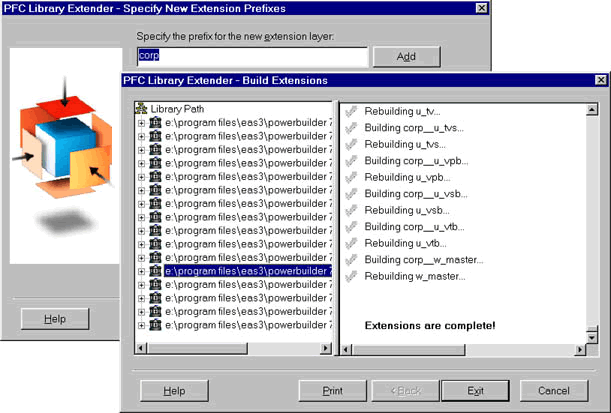
Display File > New menu option and double click on 'PFC Extender' under Tool tab page. Either select your application object or specify PFC & PFE libraries path. Select the prefix for the CORP layer objects. This tool automatically adds a underscore to the prefix you specify, so don't suffix a underscore.
You can select which objects you want to place in the middle layer otherwise all objects will be placed in the middle layer and will part of the inheritance hierarchy. If you are not going to add any additional attributes/functionality or modify existing functionality, then there is no reason to place an additional layer in between, so exclude them. If you need it later, you always do it.
Depending on your computer speed it may take a while to generate all objects. Once complete, the new layer (middle layer) and PFE layer will be placed in a different directory, typically it is NewExt directory under the PFC directory. It also generates the new library list and places in the clipboard and/or a file.
| Home | Previous Lesson: Three strategies for extending PFC to multiple departments Next Lesson: Exercises |