| Home | Previous Lesson: Window Resizing Service Next Lesson: Other Services |
LUW, Logical Unit of Work, maintains the integrity of the data. The same is called as Transaction in relational databases. It either completes all the work in the scope of transaction successfully or rolls back everything specified in that transaction. This was explained in detail in 'Transactions - AutoCommit' topic in 'Embedded & Dynamic SQL' session.
PFC has custom class object n_cst_luw which takes care most of the LUW functionality. The Window object delegates all the LUW related work to this service. To understand this, let's start with w_master pfc_save event.
In a typical non-PFC application the sequence of applying changes to the database involves calling Update() function on the DataWindow control/DataStore, check for errors and call either COMMIT TRAN or ROLLBACK TRAN statements depending on the success of update. What if, if you have several DataWindows and some user objects those in turn have some DataWindows and all are part of the transaction? You will end up a lot IF and ELSE IF statements and so on.
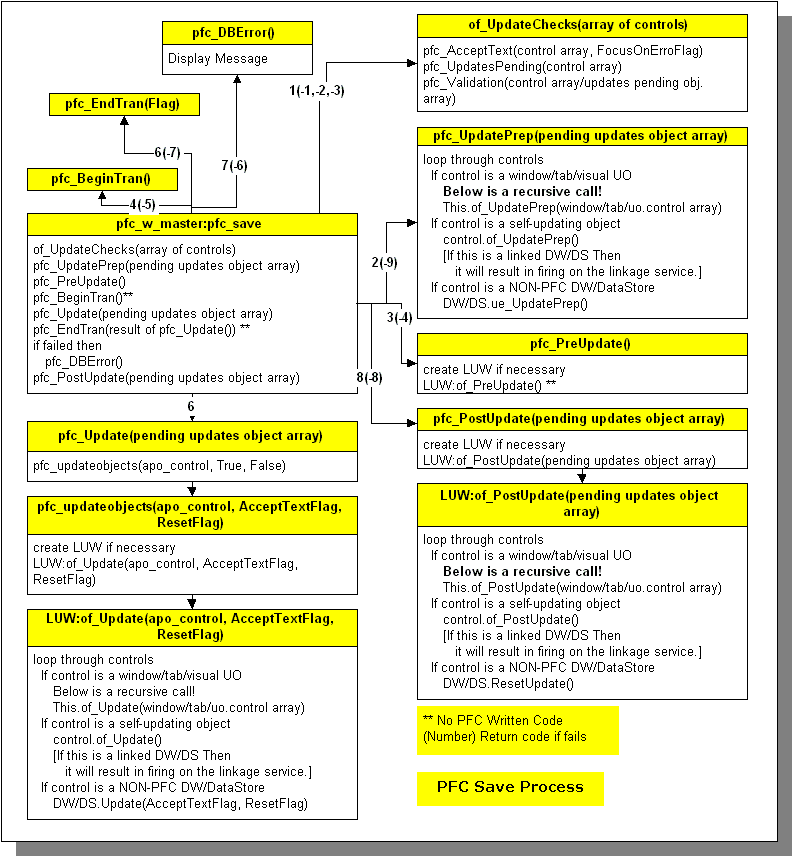
The File > Save menu option in m_master fires pfc_save event declared at the w_master window. This event triggers a lot of functions/events. First it fires of_UpdateChecks() to find out whether there are any objects that needs to be updated. If there are any, then it fires pfc_UpdatePrep event. Here is the place for you to write the code to prepare the DataWindow for update. In case of w_product_master, you don't have to write any code here, however, in w_trans window, you need to read dw_tr_head and dw_tr_detail and populate the DataStore. You should also prevent these two DataWindow from updating, since you are updating the database via DataStore. This topic is discussed in a moment. Later it fires pfc_PreUpdate() event. In case of w_tran example, you can as well move the code from pfc_UpdatePrep() to pfc_PreUpdate().
Later it fires pfc_BeginTran() event. This is a place holder event and has no code. You need to write code in this event. Call SQLCA.of_Begin() function. Again this is also a virtual function and you need to implement it. If the AutoCommit is FALSE, then you don't need to write anything here, but if the AutoCommit is set to TRUE, then you need to start the transaction by calling SQLCA.of_Execute("BEGIN TRANSACTION"). Irrespective of the AutoCommit, you need to write the code in pfc_EndTran event. Call SQLCA.of_End() and implement that function in your transaction object that was inherited from n_tr. Depending on the success, you can call SQLCA.of_Commit() or SQLCA.of_RollBack() functions. Later PFC continues with the pfc_PostUpdate() events.
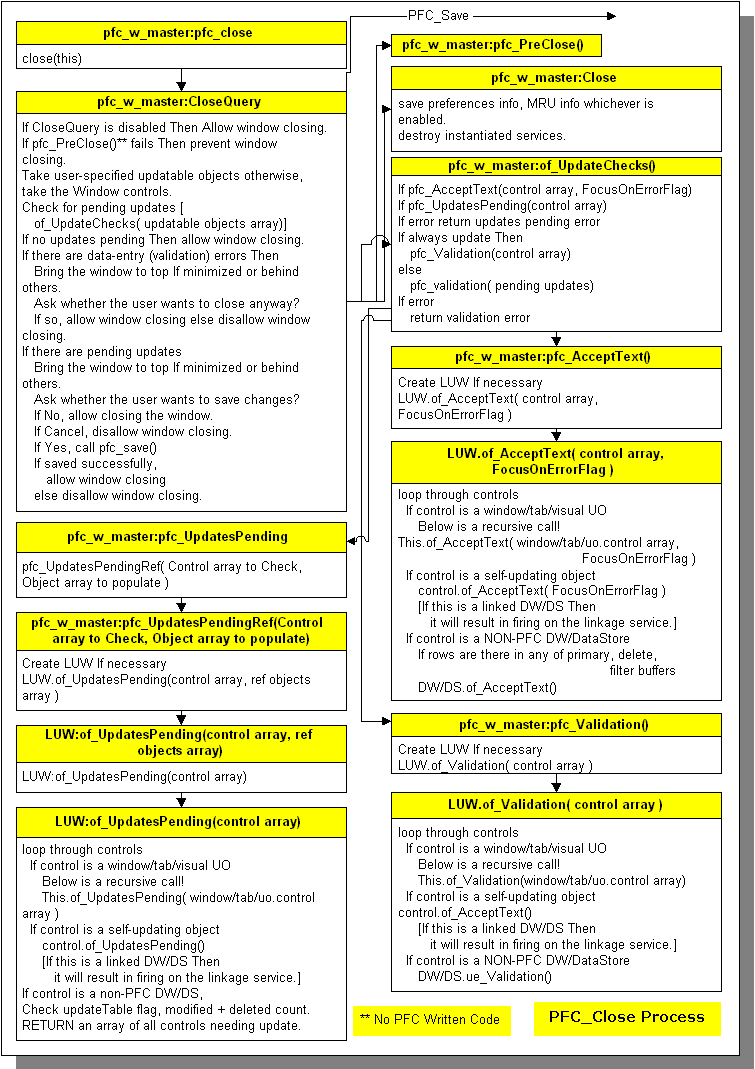
When the user try to close the window either by clicking on the Window close icon or by selecting File > Close menu option, the PFC does a lot more checks to find out updatable objects and validation errors and then finally calls PFC_Save event. The PFC_Close logic is illustrated in the first picture in this topic. In this process, PFC updates all DataWindows that are updatable and ignores non-updatable DataWindows/DataStores. If you take the case of w_tran, we need to either make both those DataWindows not-updatable or flag PFC to not to update those DataWindows by calling u_dw function of_SetUpdatable(FALSE) function.
In addition to updating DataWindow/DataStore objects, LUW also updates SUOs (Self Updatable Objects). The following are SUOs in PFC.
In order to make an object self-updatable, you need to implement the following functions.
|
Function |
Purpose |
|
of_AcceptText |
Calls the pfc_AcceptText event, which calls AcceptText functions as appropriate |
|
of_UpdatesPending |
Calls the pfc_UpdatesPending event, which determines whether the object has been updated |
|
of_Validation |
Calls the pfc_Validation event, which validates data for the object |
|
of_UpdatePrep |
Calls the pfc_UpdatePrep event, which prepares the object for update as appropriate |
|
of_Update |
Calls the pfc_Update event, which updates the database |
|
of_PostUpdate |
Calls the pfc_PostUpdate event, which performs post-update processing as appropriate |
After implementing the above functions, you need to inform PFC about it by calling:
this.of_SetUpdateable(TRUE)
If you want to update certain objects in certain order using PFC Save process, it is possible. You need to call w_master of_SetUpdateObjects() with an array of objects as argument. For example:
// The following makes JUST uo_1 and uo_2 updatable.
PowerObject  lpo_objs[ ]
lpo_objs[1] = uo_1
lpo_objs[2] = uo_2
this.of_SetUpdateObjects(lpo_objs)
// The following makes adds uo_1 and uo_2 updatable.
PowerObject  lpo_objs[ ]
Integer  li_count
lpo_objs = this.control
li_count = UpperBound(lpo_objs)
li_count++
lpo_objs[li_count] = uo_1
lpo_objs[ (li_count + 1) ] = uo_2
this.of_SetUpdateObjects(lpo_objs)
You can also make use of LUW service for a one-time update of an array of objects. For example, the following updates uo_1 and uo_2 right away and it does not disturb Window updatable objects.
int li_rc
PowerObject 	lpoa_Save[]
lpoa_Save = { uo_1, uo_2}
rc = lnv_LUW.of_Save(lpoa_save, SQLCA)
IF rc <= 0 THEN
   // Error handling
END IF
| Home | Previous Lesson: Window Resizing Service Next Lesson: Other Services |