| Home | Previous Lesson: pfc_MRURestore Next Lesson: DataWindow Services |
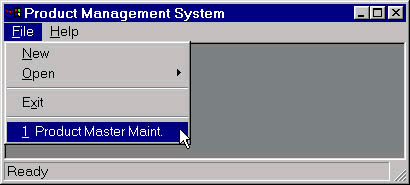
When the user clicks on the MRU menu item, it fires pfc_MRUClicked event that in turn fires Pfc_MRUProcess event. It should contain the code needed to respond to a clicked MRU menu item. This is the event you will use to open the requested window. An event argument contains a row in the internal DataStore. This row can be used to populate an instance of the n_cst_mruattrib object with the information needed to open the window.
// Object: w_product_master
// Event: pfc_MRUProcess
Window lw_frame, lw_window
n_cst_menu lnv_menu
n_cst_mruattrib lnv_mruattrib
// Check parameters.
IF IsNull(ai_row) THEN	Return -1
IF NOT IsValid(gnv_app.inv_mru) THEN Return -1
// Retrieve row from DataStore.
gnv_app.inv_mru.of_GetItem(ai_row, lnv_mruattrib)
// Get the MDI frame, if necessary.
lnv_menu.of_GetMDIFrame(this.menuid, lw_frame)
OpenSheet(lw_window, lnv_mruattrib.is_classname, lw_frame)
Return 1
As explained earlier, MRU service uses the INI file or the registry to save MRU menus specific information between multiple application executions. INI files or the registry can only save string information (PowerBuilder has a function to read numeric data from INI file). If you open the window with non-traditional datatypes such as PowerBuilder class object, structure, the data contained within that object has to be encoded into a string. This can be done by overriding the pfc_Encode event in your version of the object that is inherited from n_cst_mru and calling the ancestor event at the end. Similarly decoding logic should be added to the pfc_Decode event. Please note that there is a 100 character limit imposed by the MRU DataStore. If you are using INI file, then there is a 4K limitation per key entry and 64K total INI file size.
| Home | Previous Lesson: pfc_MRURestore Next Lesson: DataWindow Services |