| Home | Previous Lesson: Building Proxy Objects Next Lesson: Stopping Connections Remotely |
If you haven't created a library for the server application, create a library product-server.pbl and create an application pms in this library. Then copy all the DataWindows from the product.pbl into this library. This is needed because, we are using DataStores on the server. Then copy the user object ncst_product_master�you don't have to copy proxy object.
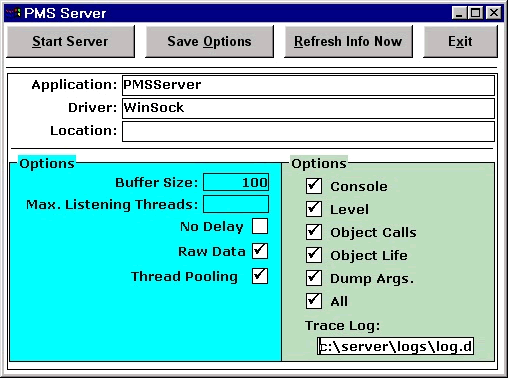
Create a window w_pms_server as shown below. Name CommandButtons as cb_start_or_stop_server, cb_server_options, cb_refresh and cb_exit respectively from left to right. Below is a DataWindow dw_users. There is another DataWindow dw_options right behind the dw_users.
Paint a tabular/Grid presentation style, external data source DataWindow d_users with the following structure
|
Name |
Type |
Length |
|
userid |
String |
16 |
|
connecttime |
datetime |
|
|
busy |
String |
3 |
|
lastcalltime |
datetime |
|
|
callcount |
long |
|
|
clientid |
String |
16 |
|
location |
String |
16 |
|
connectuserid |
String |
16 |
|
connectstring |
String |
100 |
Paint a FreeForm presentation style, external data source DataWindow d_server_options with the following structure.
|
Name |
Type |
Length |
|
Application |
String |
30 |
|
driver |
String |
20 |
|
location |
String |
60 |
|
opt_bufsize |
number |
|
|
opt_ThreadPooling |
number |
|
|
opt_maxListeningThreads |
number |
|
|
opt_nodelay |
number |
|
|
opt_rawdata |
number |
|
|
trace_console |
number |
|
|
trace_level |
number |
|
|
trace_log |
String |
60 |
|
trace_objectcalls |
number |
|
|
trace_objectlife |
number |
|
|
trace_dumpargs |
number |
|
|
trace_all |
number |
To make the server to listen to the clients, we need to do four things.
First let's define registry entries and set them with proper default values. Select Start > Run menu option from the taskbar and run REGEDIT command and define HKEY_LOCAL_MACHINE\SOFTWARE\PMS key in the registry. Then create the following sub-keys and populate them as shown below:
|
Key/ String Value in the Registry |
SubKey |
Value |
|
Application |
PMSServer |
|
|
Driver |
WinSock |
|
|
Location |
LocalHost |
|
|
Options |
||
|
BufSize |
100 |
|
|
MaxRetry |
5 |
|
|
NoDelay |
1 |
|
|
RawData |
1 |
|
|
TimeOut |
60 |
|
|
Trace |
||
|
Console |
1 |
|
|
Log |
C:\workdir\pmsserver.log |
|
|
ObjectCalls |
1 |
|
|
ObjectLife |
1 |
|
|
DumpArgs |
1 |
|
|
All |
1 |
Declare the following instance variables.
CONSTANT STRING IS_REGKEY         = 'HKEY_LOCAL_MACHINE\Software\PMS'
CONSTANT STRING IS_REGKEY_TRACE   = IS_REGKEY + '\TRACE'
CONSTANT STRING IS_REGKEY_OPTIONS = IS_REGKEY + '\OPTIONS'
Declare a global transport object. The reason we are declaring it as a global is, we need it through out the server application.
transport gtrp_Transport
Let us create the transport object in the w_pms_server window's open event.
// Event: Open
// Object: w_pms_server window
gtrp_transport = CREATE transport
We will be defining four functions.
of_SetTransportObjectValues � Reads values from registry and sets the transport object.
of_Disconnect�Disconnects the specified client from the server.
of_GetServerOptions()�Reads server options and loads into the DataWindow.
of_SetServerOptions()�Reads the server options from the DataWindow and saves in the registry.
Declare of_SetTransportObjectValues() function at w_pms_server as shown below.
// Function: of_SetTransportObjectValues() at w_pms_server window.
// Access: Private
// Returns: Integer
// Arguments: None
String ls_str, ls_str1
RegistryGet(IS_REGKEY,'Driver', ls_str)
gtrp_Transport.driver = ls_str
RegistryGet(IS_REGKEY,'Application', ls_str)
gtrp_Transport.application = ls_str
RegistryGet(IS_REGKEY,'Location', ls_str)
gtrp_Transport.location = ls_str
RegistryGet(IS_REGKEY_OPTIONS,'BufSize', ls_str)
ls_str1 = 'BufSize=' + ls_str
RegistryGet(IS_REGKEY_OPTIONS,'MaxRetry', ls_str)
ls_str1 += ',MaxRetry=' + ls_str
RegistryGet(IS_REGKEY_OPTIONS,'NoDelay', ls_str)
ls_str1 += ',NoDelay=' + ls_str
RegistryGet(IS_REGKEY_OPTIONS,'RawData', ls_str)
ls_str1 += ',RawData=' + ls_str
RegistryGet(IS_REGKEY_OPTIONS,'TimeOut', ls_str)
gtrp_Transport.Options = ls_str1
RegistryGet(IS_REGKEY_TRACE,'Console', ls_str)
ls_str1 = 'Console=' + ls_str
RegistryGet(IS_REGKEY_TRACE,'Log', ls_str)
ls_str1 += ",Log='" + ls_str + "'"
RegistryGet(IS_REGKEY_TRACE,'ObjectCalls', ls_str)
ls_str1 += ',ObjectCalls=' + ls_str
RegistryGet(IS_REGKEY_TRACE,'ObjectLife', ls_str)
ls_str1 += ',ObjectLife=' + ls_str
RegistryGet(IS_REGKEY_TRACE,'DumpArgs', ls_str)
ls_str1 += ',DumpArgs=' + ls_str
RegistryGet(IS_REGKEY_TRACE,'All', ls_str)
ls_str1 += ',All=' + ls_str
gtrp_Transport.Trace = ls_str1
Return 0
In the above function, we are reading the registry entries and loading into the global transport object variable.
| Home | Previous Lesson: Building Proxy Objects Next Lesson: Stopping Connections Remotely |