Mastering PowerBuilder
Exercises
- Move all the transactions for all the obsolete products to "t_trans_history" table using pipeline object.
 Join "trans" table and "product_master" table to find all the transactions of obsolete products.
- Similar to the way we are checking for the existing products in the ItemChanged event of "dw_product", we need put a check from the "t_product_master_history". Do this check using a DataStore.
- In the advanced DataWindows - I exercises, we have asked you to provide the print functionality in the "w_transactions" window using a hidden DataWindow control. Get rid of the hidden DataWindow control and provide the same functionality using a DataStore object.
Complete the following exercises and check your work with the following PBL.
- Enhance the ItemPopulate event�s code to provide the following functionality.
- Display the full transaction of the selected transaction in a separate DataWindow.
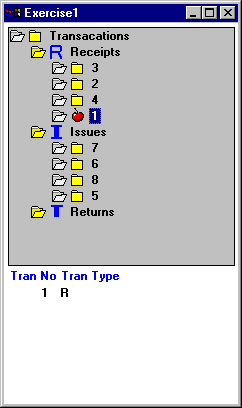
- Do all the changes that are needed in the w_treeview_demo window to have the following functionality:
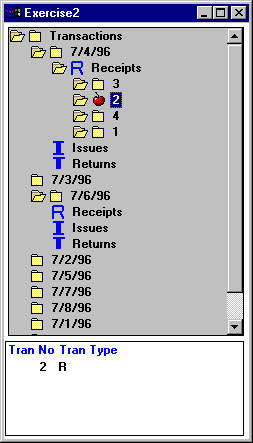
Display all the transaction dates as children to the Transactions root item. Display Receipts, Returns and Issues as children for each transaction date. Display transactions when the user selects a particular transaction.
- By studying the following references create a window with a ListView control and populate all items from product_master table into the ListView. User should be able to see the ListView in "Report View" also. Before you start studying, run the example application and run the following examples and see them in work, by that you will understand the code very easily. Study those referenced and write the code. DO NOT cut and paste the code.
|
Window Name |
Section/Example Name |
Library Name |
|
W_employee_xfer |
DataStores/ TreeView Drag/Drop |
Pbexamw2.pbl |
|
W_tv_dw_link |
DataStores/ TreeView DataWindow Linking |
Pbexamw3.pbl |
|
W_data_explorer |
DataStores/ Data Explorer |
Pbexamw1.pbl |
|
W_dir_tree |
Recurson / Directory Tree |
Pbexamw1.pbl |
|
w_add_sales_order |
Window Controls/ Sales Order ListView |
pbexamw1.pbl |
The example application has a very good example that demonstrates all the features of RTE control. That's why we are using that example through out this topic instead of rebuilding a separate example. Please refer to the following
Window Objects: w_rte, w_rte_find, w_rte_replace, w_rte_mail_merge
Menu Objects: m_rte