| Home | Previous Lesson: Defining Pipeline User Object Next Lesson: DataStore Object |
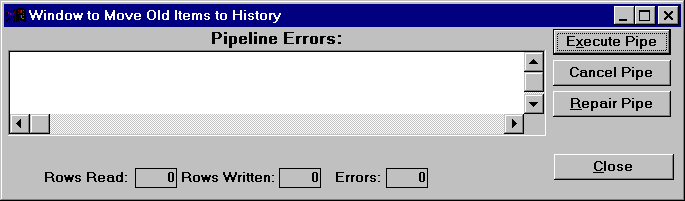
Paint a window as shown in the picture below:
The window has a DataWindow dw_error. All the controls in the right hand side are CommandButtons, cb_execute, cb_cancel, cb_repair, cb_close. The rest are StaticText controls. Name the StaticText controls in the bottom which are shown with border as st_read, st_written and st_errors ( from left to right ). Save the window as w_move_to_history. Please note that, no DataWindow object is associated with dw_error DataWindow.
Declare the following instance variables:
uop_copy_to_history ip_CopyToHistory
Transaction it_Target
Write the following code to the window's Open event:
// Object: w_move_to_history
// Event: Open
it_Target = CREATE Transaction
it_Target.dbms = sqlca.dbms
it_Target.database = sqlca.database
it_Target.userid = sqlca.userid
it_Target.dbpass = sqlca.dbpass
it_Target.dbparm = sqlca.dbparm
Connect using it_Target;
If it_Target.sqlcode <> 0 Then
SQLCA.uf_Display_Error()
Close( This )
End If
ip_CopyToHistory = CREATE uop_copy_to_history
ip_CopyToHistory.DataObject = "dp_copy_to_history"
ip_CopyToHistory.st_read = st_read
ip_CopyToHistory.st_written = st_written
ip_CopyToHistory.st_errors = st_errors
In the above code, we have created a new transaction object. This is require because, we need two transaction objects for the data pipeline execution, one for connecting to the source database and another for connecting to the target database. Actually, we are connecting to the same database "product" in this example.
After creating the transaction object, we are populating the values from the SQLCA, since we are connecting to the same database. Similarly, we have created an user object of type uop_copy_to_history. Then we set the instance variables that we have declared in the user object for displaying the status.
Write the following code for the window Close event.
// Object: w_move_to_history
// Event: Close
If IsValid( ip_CopyToHistory ) Then DESTROY ip_CopyToHistory
DESTROY it_Target
In the close event, we are destroying the objects that we have created in the open event.
// Function: wf_delete_old_products
// Arguemtns: None
// Return Value: Integer
// Access level: Private
Event: Clicked
String ls_SQLStatement
ls_SQLStatement = &
'DELETE FROM "dba"."product_master" ' + ' WHERE lower &
("dba"."product_master"."product_description") ' + &
" like 'obsolete%'"
Execute Immediate :ls_SQLStatement ;
IF SQLCA.SQLCode = 0 THEN
Return 0
Else
SQLCA.uf_Display_Error()
Return -1
End If
In this function we are deleting all obsolete products from the product_master table.
// Object: cb_execute
// Event: Clicked
Integer li_ReturnStatus
SetPointer( HourGlass! )
This.Enabled = False
cb_close.Enabled = False
li_ReturnStatus=ip_CopyToHistory.Start( SQLCA, &
			it_Target, dw_Error)
If li_ReturnStatus <> 1 Then
MessageBox("Error while copying the data to " + &
		"history table", "Error return code: " + &
		string(li_ReturnStatus))
End if
li_ReturnStatus = wf_delete_old_products()
If li_ReturnStatus = 0 Then
Commit Using SQLCA ;
Commit Using it_Target ;
Else
Rollback Using SQLCA ;
Rollback Using it_Target ;
End If
This.Enabled = True
cb_close.Enabled = True
SetPointer( Arrow! )
In the above code, we are actually executing the pipe object by calling Start() function. This function takes three parameters. Source transaction object, target transaction object and the DataWindow name in which it has to display any errors. PowerBuilder automatically creates the DataWindow depending on the errors and displays in the specified DataWindow.
Once copying is successful, we are calling a function in which we deleting all the copied rows from the product_master table. If everything is successful, then we are committing otherwise, we are rolling back the changes.
What happens when there is error. PowerBuilder displays all the errors in the DataWindow. User can then do appropriate changes and click on the Repair button.
// Object: cb_repair
// Event: Clicked
Integer li_RetStatus
li_RetStatus = ip_CopyToHistory.Repair( it_Target )
If li_RetStatus = 1 Then
li_RetStatus = wf_delete_old_products()
If li_RetStatus = 0 Then
	Commit Using it_Target ;
	Commit Using SQLCA ;
	Return 0
End If
End If
Rollback Using it_Target ;
Rollback Using SQLCA ;
Return 1
Repair() function takes the target transaction object as the parameter and applies the changes that are done to the errors in the target database.
// Object: cb_cancel
// Event: Clicked
ip_CopyToHistory.Cancel()
Rollback Using it_Target ;
Rollback Using SQLCA ;
If user wants to cancel by any reason, he can do so by clicking on the Cancel CommandButton. We are calling the Cancel() function at the pipeline object and rolling back any changes that are made.
That's all. In the open event of the application object, append the following code for testing purpose and run the application.
Open( w_move_to_history )
You will see that 0 rows are copied, since there is no obsolete product. Open the product master window at run-time and prefix few products description with "obsolete" and save it. Then run the pipe object.
You might get some errors when you try to delete any products that have transactions. This is because of the referential integrity we have declared using the foreign keys in the database. Just for the purpose of testing, add few new products in the product_master table with "obsolete" prefix in the description and try it.
| Home | Previous Lesson: Defining Pipeline User Object Next Lesson: DataStore Object |