| Home | Previous Lesson: OLE Objects Next Lesson: The PowerBuilder Window |
In the case of DDE, the server application (Word) is visible to the user. The same is true when you place an OLE 2.0 control in a window and invoke the server application. However, you don't need to place an OLE control on a window to manipulate an OLE object in your script. If you think that user interaction isn't necessary, you can create an OLE object independent of an OLE control, connect to the server application, calling functions and setting attributes as you wish for that object.
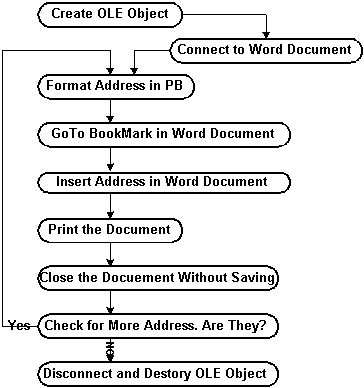
The following example uses an external data source DataWindow that contains addresses and another Word document to act as the form letter. The following figure illustrates the process involved:
If you open up "c:\workdir\ole_letter.doc", you'll see that it contains some text and a blank heading ready for the address.
We've defined a bookmark called "Address" after the word "To" and we will use this to specify where the address should go.
| Home | Previous Lesson: OLE Objects Next Lesson: The PowerBuilder Window |