Mastering PowerBuilder
Web.PB & PowerBuilder Distributed Objects
You can have a PowerBuilder application server running on the web server and make calls
from the client (web browser) in the standard CGI programming convention. Powersoft is
shipping an executable
pbcgi050.exe, which you need to set
up on the web server. When you refer to the method of an object in PowerBuilder, you need
to separate the object name and the method name with a "/". For example, the
following calls "f_get_data" function.
<FORM METHOD="GET"
ACTION="/cgi-shl/pbcgi050.exe/f_get_data">
Enter letter to search on: <INPUT NAME="search_letter">
<INPUT TYPE="SUBMIT" VALUE="search ">
</FORM>
The following is calling of_get_data function at the "ncst_web" non-visual
user object.
<FORM METHOD="GET"
ACTION="cgi-shl/pbcgi050.exe/ncst_web/of_get_data">
Enter letter to search on: <INPUT NAME="search_letter">
<INPUT TYPE="SUBMIT" VALUE="search ">
</FORM>
You also need to set up two files on the server that have the default application and
driver details and so on. One file is "pbweb.ini".
[Default]
serveralias=WebProductApp
serverobject=uo_web
[WebProductApp]
application="DPBListener" {for WinSock - Service name or Port# Server will
Listen}
location="DPBServer" {for WinSock - Host name or IP of DPB Server machine}
driver="WinSock"
In the HTML page, if you do not specify object name the default objects
are taken from this section. In the above example "uo_web" is the default
object. Powersoft is shipping two PowerBuilder libraries, which have few distributed
PowerBuilder and web examples.
The called function should return either a string value or a BLOB value. These are the
only return values supported by PowerBuilder currently. When you return a string value,
PowerBuilder executable just reads the string value and sends the value to the browser
through web server. PowerBuilder executable automatically adds the HTTP headers for you.
The HTML header it includes is:
content-type: text/html\n\n
When the return type is of BLOB data type, PowerBuilder executable calls
the specified function (of_get_data, in the above example) in a loop till the function
returns a NULL BLOB value. You need to take care of the headers. PowerBuilder doesn’t
include HTTP headers when the function return type is a BLOB data type. It means that you
have to make sure that your function returns at least the above header as the first line
in the return value otherwise, it will generate web server error. Please note that there
are two new line characters after 'text/html'. Those two new lines are mandatory.
To access the web-server environment variables, you need to pass all environment
variables to the function with the same name. PowerBuilder executable (pbcgi050.exe)
automatically populates those values for you. As you know, different web servers have
different environment variables. If you change the web server and do not modify your
server application, PowerBuilder will populate the environment variables (that are not
available) in the new web server with an empty string.
WebPB.PBL contains five important non-visual user objects.
- u_html_form
- u_html_format
- u_html_template
- u_session
- u_transaction
The most commonly used object are u_html_format and u_html_form. Web sites that
generate HTML dynamically need u_html_template, and other sites that need session
management and do transactions over the web need u_session and u_transaction. The
following section gives a detailed explanation of each object.
u_html_form
This class contains functions that are needed to create the HTML form. For example,
generating HTML code for HTML SingleLineEdit control, a DDLB, a button and so on.
Basically, you need not write any HTML code yourself. It is fine if you know the order in
which you need to write the HTML code. For example, for a form, you need to define form
properties such as, the program to be executed when the user submits the form, the method
of execution --PUT, GET or POST. Then you may want to define hidden variables --actually
not really hidden since the user can see the source code in the browser. Then, you need to
put prompts in a proper order and finally buttons to submit or clear the form.
u_htm_format
This class contains functions that are useful to generate the regular HTML, i.e.,
non-form HTML. Many functions are overloaded, giving you flexibility. The included
functions can generate code for HTML header, headings,
BODY
tags, table headers & cells, client-side image maps, links, horizontal lines, EMBED statements, APPLET tags, lists & other
formats, URL redirection, including HTML code for inserting video clips related tags and
so on.
There are functions that are specific to Microsoft and Netscape browsers also. For
example,
f_MakeBanner(), which generates HTML code for
banners --when the user scrolls down the web page, the banner stays in place-- is
applicable only for Netscape. Before calling this function, you need to check the user's
browser type, otherwise, this tag is of no use, i.e., Internet Explorer ignores this tag.
Few missing things are a function to generate HTML code to include ActiveX control in
the web page and no HTML 4.0 and cascading style sheets support.
Incase you don’t know what an
URL redirection
means. Did you ever come across sites that display 'Sorry, our website has moved to so and
so place’, and in the next 5 seconds, you are automatically taken to the new place.
That's what redirection means. In the HTML code we instruct the browser --using 'location'
meta tag-- to get pages from the specified site.
Incase you don’t know what client-side / server-side image mapping
means, you are in luck, because the following gives you a briefing. Did you ever see sites
that put a big image and you will be displayed the appropriate web page, depending on the
location you click in the image. If not, browse http://www.applied-software.com, the treeview picture you see on the home page is nothing but a client-side
image map. The web browser knows the co-ordinates of the mouse pointer when you click at a
location on the image. In server-side mapping, the browser sends the co-ordinates to the
web server and the web server decides which page to display. Where as in the client-side
image mapping, the page that need to be displayed for that co-ordinates is coded as part
of the HTML code. That means, the browser will request the page directly. In the above
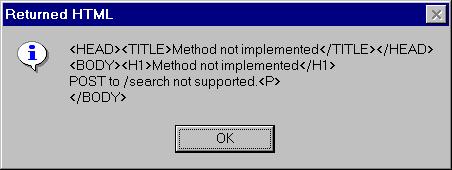
picture 'page.cgi' CGI program is being called with 'mastering-pb' as the parameter,
because, it is a client-side image mapping. If it is a server-side image map, the browser
would have send the x,y co-ordinates instead of 'page=mastering-pb' parameter.
u_html_template
All most all the sites that generate HTML dynamically use templates. For example, you
may want to have different templates for questions & answers page, artciles page, and
so on. In that case create the HTML page that looks like your original page with no data
in it, instead of using unique dummy tags. For example, you may want to use
FILL_TAG_QUESTION tag for question and FILL_TAG_ANSWER for answer and FILL_TOP_AD1,
FILL_SIDE_AD1 for advertisements at different locations of your page. When the browser
requests a questions & answers web page, you read the template, read the data --from
flat files or database-- and replace tags with the appropriate data and send it to the
client. 'u_html_template' itself is not a template. However, the functions available in
this object allow you to read a template and replace the tags with the data before sending
it to the web client.
u_session
HTTP, the key word you give before the URL name for ex:
http://www.applied-software.com, is the protocol used to display the web pages. HTTP is a
stateless protocol, that means, if you request a page that has 10 images, the browser will
connect to the web server 11 times --once for the page itself and one for each image-- and
disconnects each time. Once you download the full page, you are no longer connected to the
web server 'applied-software.com'. Don’t confuse this with your telephone
connection. The telephone connection is still busy because you dialed to a number without
which you can't access the web, unless you have a proxy server (with the Proxy server, the
proxy is always connected to the internet service provider). From the web server
perspective, if you are the administrator and want to see who are all logged, your
connection details will not appear, since, you already completed downloading the page.
This will not happen when you write a PowerBuilder application. You connect (in the
program) at the beginning of the app and disconnect at the end. That means till you
disconnect, you are connected to that database server and will be listed in the currently
logged user list. However, there is no
CONNECT and DISCONNECT kind of things in HTML.
You need to take care of generating session ids and storing it somewhere --flat files
or a database -- and send it to the client. When the browser requests a page the next
time, it sends the session id to the server --nothing is automatic. You need to write the
code to send the session id to the server, either using hidden form variables or as
arguments to the CGI program in a link or image maps-- and the server retrieves the
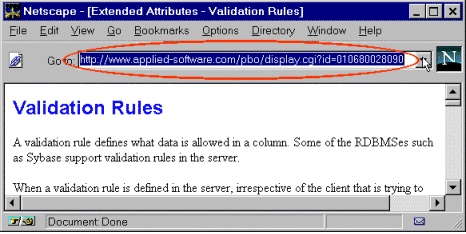
session details and sends the appropriate page. In the following example, session id
'010680028060' is being sent to the web server as an argument value for the 'id' argument
at
http://www.applied-software.com, to display the next
page (do not fiddle around the session id at that site, as we take care of those things).
u_transaction
This object has functions to create the transaction ids in the database, data caching.
You may want to use this object along with u_session object.