The most powerful feature in the library is query DataWindow generation. You don't have to limit your queries to the views. Actually, views are nothing but queries in the Lotus Notes database, however in Lotus Notes you are limited to the views that are defined by the Lotus Notes database designer. If you would like to make your own queries, you can do so using PowerBuilder Library for Lotus Notes.
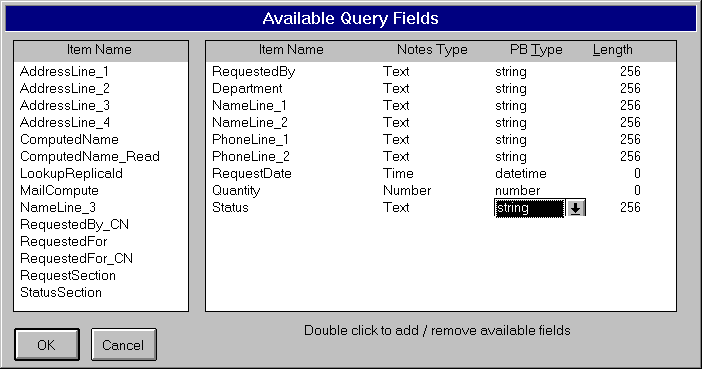 To create a Lotus Notes
query DataWindow, invoke the DataWindow builder
and select the Lotus Notes server name and the
database name. You will not find any query names
under the 'Query' heading. Just select 'Query'
option and click 'OK' button. DataWindow Builder
utility will scan for all the fields defined in
the selected database and presents them to you.
From those displayed fields, you can select the
fields you want to use in the Query DataWindow
object. You can change the PowerBuilder field
datatypes and their lengths but not the data
types & lengths defined in the Lotus Notes
database. Select all the fields and save the
DataWindow.
To create a Lotus Notes
query DataWindow, invoke the DataWindow builder
and select the Lotus Notes server name and the
database name. You will not find any query names
under the 'Query' heading. Just select 'Query'
option and click 'OK' button. DataWindow Builder
utility will scan for all the fields defined in
the selected database and presents them to you.
From those displayed fields, you can select the
fields you want to use in the Query DataWindow
object. You can change the PowerBuilder field
datatypes and their lengths but not the data
types & lengths defined in the Lotus Notes
database. Select all the fields and save the
DataWindow.
Now, you are ready with all the DataWindows that simulate Lotus Notes views, forms and queries (Queries are not Lotus Notes objects). It is time to create windows and menus for the application and use these DataWindow objects.
Developing a PowerBuilder application to access Lotus Notes database is no different from a regular PowerBuilder application development with a few exceptions.
- You need to add Qnotes.PBL in the application's library search path
- Use u_notes_object user object (a standard DataWindow user object) in place of a DataWindow control. This user object has overwritten functions --such as Retrieve(), Update(). These functions implement the logic to access the Lotus Notes database.