Once we create the mail session, we need to logon to the mail system.
imRet_MailReturnCode = &
        ims_MSession.MailLogon( MailNewSession! )
If imRet_MailReturnCode <> MailReturnSuccess! Then
   MessageBox ("Mail Logon", &
	‘Unable to log on to Mail System!' )
   Return
End If
In the above code we are calling MailLogon() to log on to the mail system. We are not passing user id and password to this function instead, we are passing an enumerated value MailNewSession!. User id and password to this function are optional. If you are accepting the user name and password in your application you can as well call this function with user id & password. Otherwise you can use profiles.
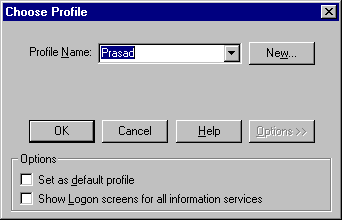 Under
Windows 3.x operating system, mail user
information is stored under MSMAIL.INI file. When
you do not supply user id & password, the
user will be prompted for the profile name to use
as shown in the picture. The profile is an ASCII
file typically have extension .INI. However under
Windows 95/NT, all the profile information is
stored in the registry. The following two
registry keys contain mail user information.
Under
Windows 3.x operating system, mail user
information is stored under MSMAIL.INI file. When
you do not supply user id & password, the
user will be prompted for the profile name to use
as shown in the picture. The profile is an ASCII
file typically have extension .INI. However under
Windows 95/NT, all the profile information is
stored in the registry. The following two
registry keys contain mail user information.
HKEY_USERS/Windows Messaging Subsystem/Profiles
HKEY_CURENT_USER/Software/Microsoft/CurrentVersion/Windows NT/Windows Messaging Subsystem/Profiles