You have the choice of two type of codes, P-Code or machine code. In previous versions, you don’t have a choice, you have to create P-Code. P-Code is executed in the interpreted mode by PowerBuilder. P-Code files are smaller compared to the machine code files and runs slower than machine code files. P-code files are smaller because, two or three machine code instructions translates into one P-Code instruction. When you choose P-Code, PowerBuilder generates PBDs (PowerBuilder Dynamic Linked Libraries).
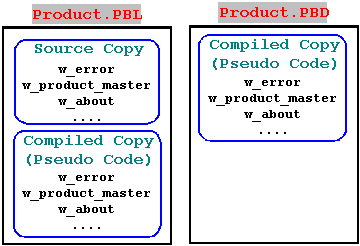
As you know, PowerBuilder stores all the PowerBuilder object in the PowerBuilder library with .PBL extension. In the development environment, every time you do change and save the object, PowerBuilder generates the Pseudo-code for that object. You will never observe this step since it’s transparent to you. Then, PowerBuilder saves the object in the library in two forms. One in the source format and the other in the compiled (Pseudo-code) format. Generating p-code is less time consuming task compared to machine code generation. When you create the .PBD files (P-Code), PowerBuilder simply copies the compiled code from the library to the .PBD file. That’s why you will find the .PBD files is smaller than .PBL file.