By default for each DataWindow user object "u_dw", popup menu is turned on. You don’t have to turn any service on or off.
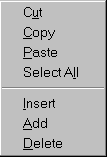
PFC DataWindow's Popup Menu.
Using this popup menu user can append a record or insert a record before the current row. You don’t have to write any code. If you use DataWindow user object "u_dw" for reporting purpose, still this menu is available. You may want to disable add/insert options by writing the following code to the pfc_PreRmbMenu event of the specific DataWindow user object in the window.
am_dw.m_table.m_insert.enabled
= False
am_dw.m_table.m_addrow.enabled
= False
Before displaying the popup menu, PFC triggers this event and sends the menu as argument "am_dw".
Place an user object "u_dw" in the "w_product_master" (from the pfc_product library) and name it as "dw_product". Assign "d_products_maint" DataWindow object to this control.