| Home | Previous Lesson: Does TriggerEvent Really Trigger an Event? Next Lesson: Summary |
Sometimes, you may want to execute an event asynchronously, i.e., the current script shouldn't wait for the completion of the posted event execution. In those cases, you need to use the PostEvent() function. The format is same as TriggerEvent().
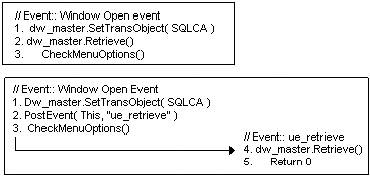
An example of where you could use the PostEvent() is, to populate DataWindow while the window opens. You can do this in two ways:
You can write script in the window's open event. This works fine, but, for the user, it means a delay in opening the window, since (s)he can't see the window until the execution of it's open event. As an alternate, you can use the PostEvent() function.
When PowerBuilder encounters this command, it simply posts the message in the PowerBuilder's internal object message queue and starts executing the command after PostEvent() function call. In the message queue, whenever messages before the posted message is executed, PowerBuilder executes the event specified in the PostEvent(). Typically, posted events are executed at the end of the current script, however, it is not guaranteed. It all depends on the messages pending in the message queue. In short, the current script doesn't wait for the results of the event script execution, specified in the PostEvent() function call.
You can also post events or functions with the new syntax, explained in the previous topic, by using POST keyword in place of WHEN.
{ObjectName.}{Type} {CallType} {When} Function/Event
                              Name ({ ArgumentList})
Again, using PostEvent() function or POST keyword do not actually make the events happen, instead, they simply execute the script for the specified event. Use Post() for this purpose as explained in the "Choosing between Events and Functions" topic. The syntax for Post() is similar to Send().
| Home | Previous Lesson: Does TriggerEvent Really Trigger an Event? Next Lesson: Summary |