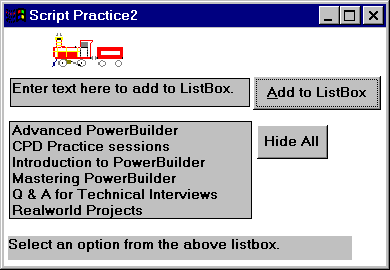
|
Tip: |
AddItem() |
|
Answer: |
|
Tip: |
SelectionChanged Event. |
|
Answer: |
See solution of exercise one. |
|
Tip: |
Clicked event, Hide(), Show() and Visible Property. |
|
Answer: |
See solution of exercise one. |
| Home | Previous Lesson: Review Questions & Answers Next Lesson: PowerScript - Database Operations |
Please complete the following exercises. We advise you not to download the solution until you complete the exercises. Please note that the following exercises are not part of the 'Product Management System' project, these are designed to give you experience in events & PowerScript only.
|
Tip: |
AddItem() |
|
Answer: |
|
Tip: |
SelectionChanged Event. |
|
Answer: |
See solution of exercise one. |
|
Tip: |
Clicked event, Hide(), Show() and Visible Property. |
|
Answer: |
See solution of exercise one. |
|
Tip: |
You need to declare an instance variable by selecting Declare from the left DDLB in the script painter and selecting 'Instance Variables' from the right DDLB in the script painter. We know that this topic is not yet covered, but knowing one point is good enough for this exercise. The instance variable is accessible throughout the window. You need to write script to Clicked event of the picture control and MouseMove event of the window. You may want to use PointerX() and PointerY() functions to get the mouse pointer's x and y co-ordinates. Good luck! |
|
Answer: |
See solution of exercise one. |
| Home | Previous Lesson: Review Questions & Answers Next Lesson: PowerScript - Database Operations |