| Home | Previous Lesson: Continue Statement Next Lesson: PowerScript Pronouns |
Use special characters such as tab or new line in a string by prefixing them with the tilde character (~). The following table lists the special characters:
|
To denote these special characters... |
...use these character combinations |
|
Newline |
~n |
|
Tab |
~t |
|
Vertical tab |
~v |
|
Carriage return |
~r |
|
Formfeed |
~f |
|
Backspace |
~b |
|
Tilde |
~~ |
|
Decimal number |
~nnn |
|
Octal number |
~oxxx |
|
Hexadecimal number |
~hyy |
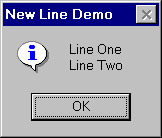
The following example demonstrates the use of a new line character.
MessageBox( "New Line Demo", "Line One" + &
            "~n" + "Line Two")
MessageBox() is a global function. It takes at least two arguments. One argument is for the title and another is for the message itself. If a new line character is not given in the message, it is displayed on one line. If the above code is executed, PowerBuilder displays the following message box.
| Home | Previous Lesson: Continue Statement Next Lesson: PowerScript Pronouns |