
| Home | Previous Lesson: Questions & Answers Next Lesson: DataWindow Painter |
You need to create the following objects. The left most column in the following table lists the object that you need to create and also has the link to the deatil list of those objects. The second column lists the files that have SQL statements to create those objects. You can use these files in two different ways. One, you can execute them in the database administration painter and objects will be created for you. We don't recommend this way. Instead we would like you to create those objects and export those object definitions and compare with the SQL that is listed in the files (second column). The third column lists the files that insert sample data into those tables. The data is also displayed in the picture for each table.
|
Table Name |
SQL to create table, index |
SQL to create Data |
|
None |
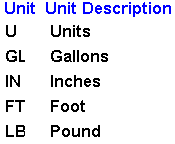
Create the units table as shown in the following picture and enter the data as shown.
|
Property |
Value |
|
Primary key |
Unit |
|
Index Name |
xunits |
|
Index Columns |
unit. Ascending, Unique |
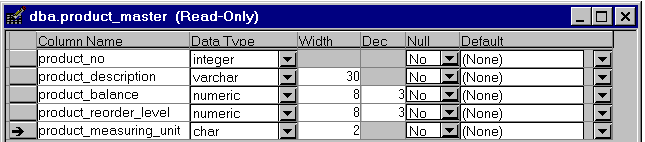
Create product_master table as shown in the picture and enter the data as shown.
|
Property |
Value |
|
Primary key |
product_no |
|
Index Name |
xproduct_master |
|
Index Columns |
product_no. Ascending, Unique. |
|
Foreign Key Name: |
Fmeasurement_unit |
|
Foreign Key |
product_measurement_unit referring to unit in the units table |
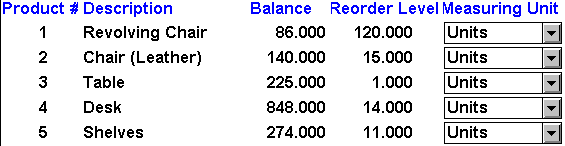
Please ignore the product_measuring_unit column's edit style shown in the picture for now. It is a DropDownDataWindow edit style and will be explained in the DataWindow session.
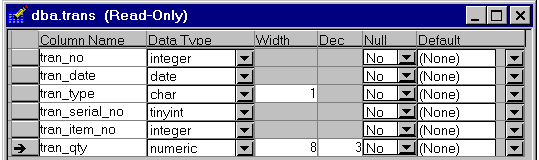
Create 'trans' table as shown in the picture and enter the data as shown.
|
Property |
Value |
|
Primary key |
tran_no, tran_serial_no |
|
Index Name |
xtrans |
|
Index Columns |
tran_no, tran_serial_no. Ascending, Unique. |
|
Index Name |
xtrans2 |
|
Index Columns |
tran_date. Ascending, Duplicate. |
|
Foreign Key Name: |
ftran_item_no |
|
Foreign Key |
tran_item_no referring to product_no in product_master table |
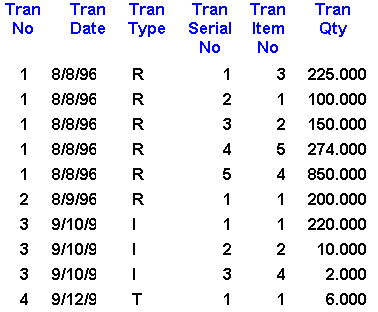
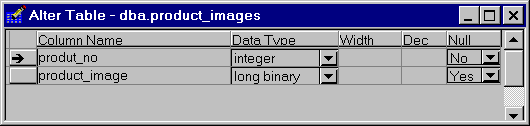
Create product_images table as shown in the picture. This table doesn't have any sample data. The reason is that, you need to follow special procedure to insert images into the table, which is not explained and is too advanced at this stage. We will explain this in the OLE session.
|
Property |
Value |
|
Primary key |
product_no |
|
Index Name |
xu_product_images |
|
Index Columns |
product_no. Ascending, Unique. |
|
Foreign Key Name: |
fproduct_no_images |
|
Foreign Key |
product_no referring to product_no in product_master table |
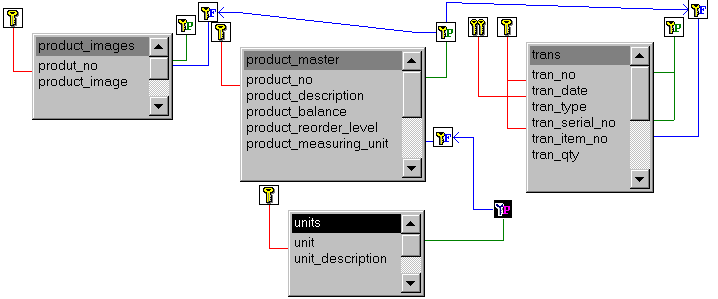
Once you define all the above tables, it should look like in the following picture:
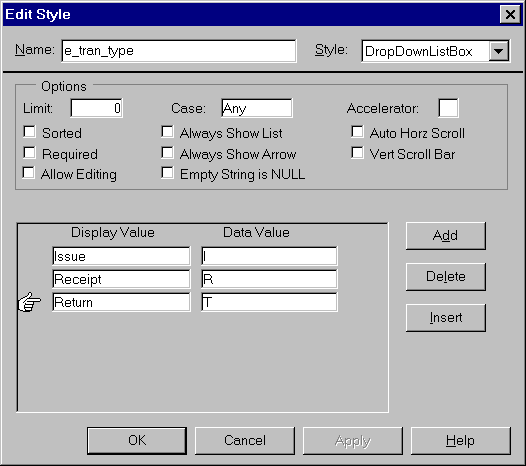
After defining, assign it to tran_type column in trans table.
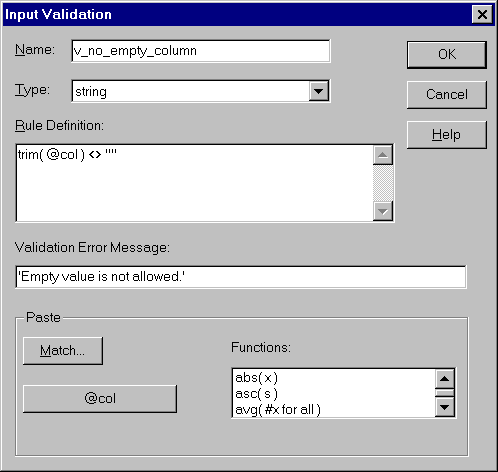
After defining, assign this rule to product_description in product_master and unit-description in units table and unit column in units table.
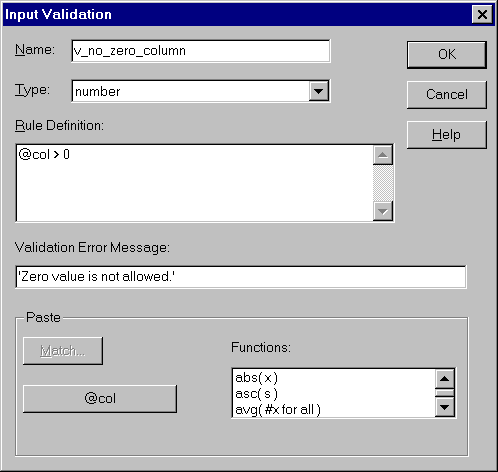
After defining, assign this rule to product_reorder_level column in product_master and tran_qty, tran_serial_no, tran_no, tran_item_no in trans table.
| Home | Previous Lesson: Questions & Answers Next Lesson: DataWindow Painter |