| Home | Previous Lesson: MicroHelp Property Next Lesson: Assigning a Shortcut Key |
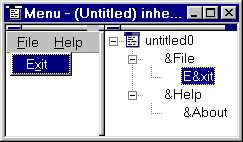
An accelerator key is the underlined letter in the text of a menu item or a window object. User can access the menu items or objects using the keyboard instead of the mouse by pressing the specified key along with the Alt key. A well-designed application should make use of this feature. Offering full keyboard compatibility is a must for all professional applications.
An ampersand character (&) is placed in front of the letter to be used as an accelerator key. For example, the accelerator key for the Exit menu bar item is x, so you need to type E&xit for that. If you need to display ampersand character in the menu bar/item text, provide two ampersands. For example, to display 'Print in Black & White', you need to type 'Print in Black && White'.
| Home | Previous Lesson: MicroHelp Property Next Lesson: Assigning a Shortcut Key |