| Home | Previous Lesson: Duplicating Controls Next Lesson: Listing Controls |
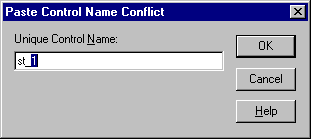
Another way of duplicating a control is to use the Copy and Paste options from the Edit menu or use the Ctrl+C and Ctrl+V shortcut keys. When you use this method of copying controls, all the properties of the original control will be copied including scripts if any and the name of the control. For example, if you copy one of the CommandButton, you'll get the following warning:
You can't have two controls with the same name on the same window, so you have to type in a new name before PowerBuilder creates the new control. The control is copied directly on top of the original control, so you'll have to move it to verify that its presence
You can also use Copy and Paste method to copy controls between windows. PowerBuilder does allow you to have two controls with the same name in different windows, so you won't get a naming conflict warning when you attempt to copy a control onto the other window.
| Home | Previous Lesson: Duplicating Controls Next Lesson: Listing Controls |