| Home | Previous Lesson: Breakpoints View Next Lesson: Source View |
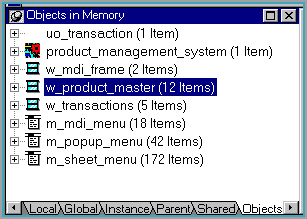
This view lists objects present in the memory at any moment of time, and you can expand them and see the value of each variable. For example, you can expand w_product_master in the following picture and see the objects in that instance of the window.
Do you remember the classic problem of debugging an object, i.e., finding the value of a local instance variable in the script, when it is out of focus. An example would be when we call of_OpenSheet() with the window name as the argument, from the clicked event of every menu item that needs to open a sheet in the MDI frame.
window lw_sheet
OpenSheet( lw_sheet, aw_window_name, ParentWindow,0,Cascaded! )
Return 0
In of_OpenSheet() we are declaring a variable lw_sheet of type window, and the reference to the opened sheet is placed in it. Once the function completes execution, the opened window is visible; however, we don't have any reference to that sheet, since, the local variable goes out of scope as soon the script completes execution. The problem arises when you want to debug that particular instance. How are you going to do it? Well, the first thing that crosses the mind is to place a breakpoint in the script of that window, but, can you refer to the value of another instance of the same window? No. For that, what you can do with this new debugger is use the 'Objects in Memory' view.
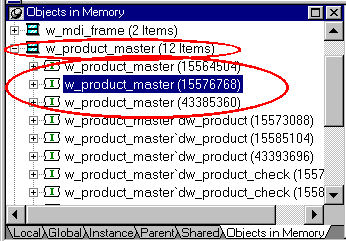
For example, the above picture has three instances of w_product_master and the current line of script is in the third instance. Expand w_product_master and you see the three instances of the same window. Expanding the second instance displays the values of that instance.
| Home | Previous Lesson: Breakpoints View Next Lesson: Source View |