| Home | Previous Lesson: Calling an External Function Next Lesson: Multimedia and PowerBuilder |
In this section we are going to call a subroutine GlobalMemoryStatus to find out memory details. According to the definition of subroutines, they don't return anything. So is this subroutine. It takes structure as an argument and populates memory details in it. After calling this subroutine, we can refer to it for the memory details. You can pass PowerBuilder structures to external C functions, as long as they have the same definition (with equivalent datatypes) and the same order of the structure members.
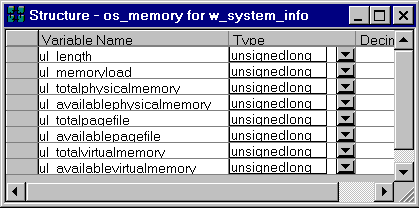
Open w_system_info. Declare a structure os_Memory, as shown in the following picture, by selecting Declare > Window Structures from the menu.
Declare the following external function, by selecting Declare > Local External Functions� from the menu.
Subroutine GlobalMemoryStatus (ref os_Memory ls_Memory ) &
Library "KERNEL32.DLL"
Append the following code to the Open event of "w_system_info" window.
os_Memory ls_Memory
GlobalMemoryStatus( ls_Memory )
sle_tot_phy_mem.Text = &
     String( (ls_Memory.ul_TotalPhysicalMemory/ &
          (1024 * 1024)), "#,###.00" ) + "MB"
sle_ava_phy_mem.Text = &
     String( (ls_Memory.ul_AvailablePhysicalMemory/ &
          (1024 * 1024)), "#,###.00" ) + "MB"
sle_tot_vir_mem.Text = &
     String( (ls_Memory.ul_TotalVirtualMemory/ &
         (1024 * 1024)), "#,###.00" ) + "MB"
sle_ava_vir_mem.Text = &
      String( (ls_Memory.ul_AvailableVirtualMemory/ &
         (1024 * 1024)), "#,###.00" ) + "MB"
sle_tot_page_size.Text = &
      String( (ls_Memory.ul_TotalPageFile/ &
         (1024 * 1024)), "#,###.00" ) + "MB"
sle_ava_page_size.Text = &
      String( (ls_Memory.ul_AvailablePageFile/ &
         (1024 * 1024)), "#,###.00" ) + "MB"
In the above code, we are declaring a local variable "os_Memory" of structure type and sending that variable as the argument to the subroutine. Later on we are accessing the values of the structure members with the . (dot) notation.
Run the application and test the code.
| Home | Previous Lesson: Calling an External Function Next Lesson: Multimedia and PowerBuilder |