| Home | Previous Lesson: Introduction Next Lesson: Datatypes For External Function Arguments |
Like any other function you create in PowerBuilder, you can declare an external function at two different levels, Global and Local. The scope of a "global external function" is similar to "global variables"; they can be accessed from anywhere in the application. Local external functions are defined at window, menu, or an user object. These functions are part of the object's definition and can always be used in the scripts for the object itself. The accessibility of a Local external function is similar to instance variable.
You can declare a global external function by selecting Declare > Global External Functions from any painter except Library, Structure painters in the PowerBuilder. You can declare a local external function by selecting Declare > Local External Functions from the menu when the object (window/menu/user object) painter is open.
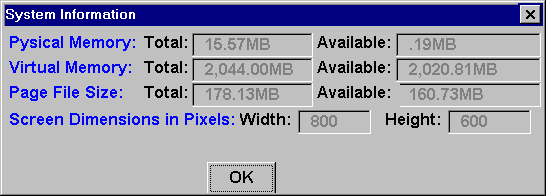
Invoke the window painter. Select New from the Select Window dialog box. Save this window as w_system_info. Make the window a Response window. Paint it as shown in the following picture.
All the controls in the picture that are displaying numbers are SingleLineEdit controls. Name them as follows (left to right, top to bottom):
sle_tot_phy_mem, sle_ava_phy_mem, sle_tot_vir_mem, sle_ava_vir_mem, sle_tot_page_size, sle_ava_page_size, sle_screen_width, sle_screen_height.
The Declare External Function dialog box (picture not shown here) title bar identifies the type of function you are declaring(global or local). The text box displays the declared external functions. If no external function is declared, the MultiLineEdit is blank.
After OK button is clicked, PowerBuilder compiles the declaration. If there is any syntax errors, error messages are displayed, and you must correct them before PowerBuilder saves the declaration.
{access} FUNCTION ReturnDatatype Name &
( { {REF} datatype1 arg1, ..., {REF} datatype arg } ) &
LIBRARY libname ALIAS FOR ExternalFunctionName
Ampersand is not part of the syntax. However, you need to use & (Ampersand) if the function declaration spans multiple lines.
You can also declare external subroutines, which are same as external functions, except that they don't return values.
{access} SUBROUTINE Name ( { {REF} datatype1 arg1, &
..., {REF} datatypen argn } ) LIBRARY libname ALIAS FOR &
ExternalFunctionName
Access Level: When declaring a local external function, you can specify its access level, i.e., you can specify the scripts that can have access to the function. The access level can be Public, Private or Protected. You have already learned about access levels in the "OOP - PB Implementation" session.
 Global external functions always have Public access level.
FUNCTION or SUBROUTINE: A keyword that determines the way return values are handled. If there is a return value, declare it as a FUNCTION. If it returns nothing or returns VOID, specify SUBROUTINE.
Return Datatype: The Datatype of the value returned by the function.
Name: The name of a function or subroutine that resides in a DLL.
REF: Specifies that you are passing the parameter by reference. By default, PowerBuilder passes parameters by value.
Datatype Arg: The Datatype and name of the arguments, for the function or subroutine. The list must match with the definition of the function in the DLL. Each datatype, argument pair can be preceded by REF.
LIBRARY "libname": The LIBRARY keyword is followed by a string containing the name of the DLL in which the function or subroutine is stored. Windows' DLLs usually have the extension DLL or EXE. The library name is enclosed in quotation marks.
The full path should not be specified, but the library must be available to the application at execution time in the MS-Windows PATH or application PATH.
ALIAS FOR "extname": This clause is optional. If the name in DLL is not the name you want to use in the script or if the name in the database is not a valid PowerScript name, you must specify ALIAS FOR "extname", to establish an association between the PowerScript name and the external name. This can happen if the function name conflicts with the PowerBuilder reserved name.
| Home | Previous Lesson: Introduction Next Lesson: Datatypes For External Function Arguments |