 icon and select 'Procedure Declare' menu option. Alternately, you can display popup menu in the script painter and select 'Paste Special > SQL > Procedure Declare' menu option. This brings up a list of currently available procedures:
| Home | Previous Lesson: Using a Stored Procedure In PowerScript Next Lesson: Executing a Stored Procedure |
To declare a stored procedure, you need to click on icon and select 'Procedure Declare' menu option. Alternately, you can display popup menu in the script painter and select 'Paste Special > SQL > Procedure Declare' menu option. This brings up a list of currently available procedures:
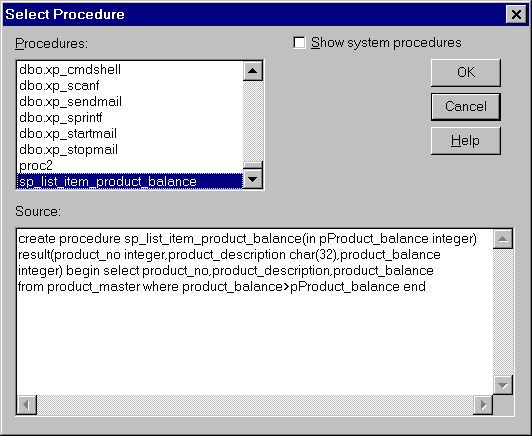
When you select the procedure you want, you'll be prompted to supply parameters that are required:
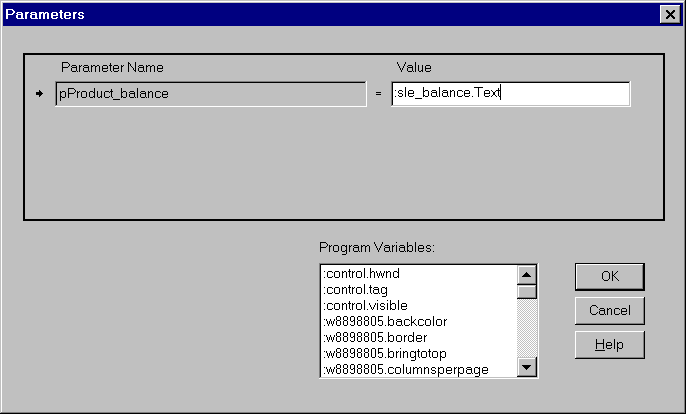
This allows you to select from a predefined list of available program variables. For example, if you have a SingleLineEdit control on your window, you can supply the text attribute as a parameter, so that a user could type in a value at run-time.
Once you supply the parameter values, you'll be prompted for the procedure name, which would be used to refer to the stored procedure in PowerBuilder:
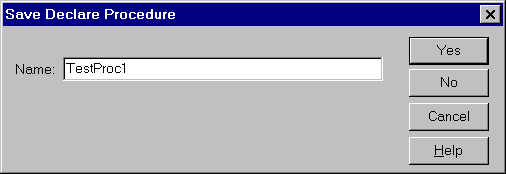
The declaration statement will then be pasted into your script:
DECLARE TestProc1 PROCEDURE FOR sp_list_item_product_balance
pProduct_balance = :sle_balance.Text ;
| Home | Previous Lesson: Using a Stored Procedure In PowerScript Next Lesson: Executing a Stored Procedure |