| Home | Previous Lesson: Review Questions & Answers Next Lesson: Object Orientation�PB Implementation |
Please complete the following exercises. We advise you not to download the solution until you complete the exercises. Reading the solution without completing the exercise might make things tougher in your real-life projects, since you never tried the code before. If you have any questions, you can always e-mail me at prasad@applied-software.com
|
Tip: |
It would be very tedious to print multiple DataWindows on the same page. You may want create another DataWindow object with group presentation style and assign it to a hidden DataWindow control or use the DataStore object (Go for hidden DataWindow control instead of DataStore since this topic is not covered yet). Another tip: RowsCopy() function. |
|
Solution: |
|
Tip: |
Write script in the RowFocusChanged event. |
|
Solution: |
|
Tip: |
Read the code for the "ue_add" event and get an idea about what to write. |
|
Solution: |
|
Tip: |
You may use the DataWindow control used to print a transaction. However, create a different DataWindow object for this purpose. Use Modify() function to put the DataWindow in read-only mode and vice-versa. Use ItemChanged event to set the focus to detail DataWindow and "tran_serial_no" field. |
|
Solution: |
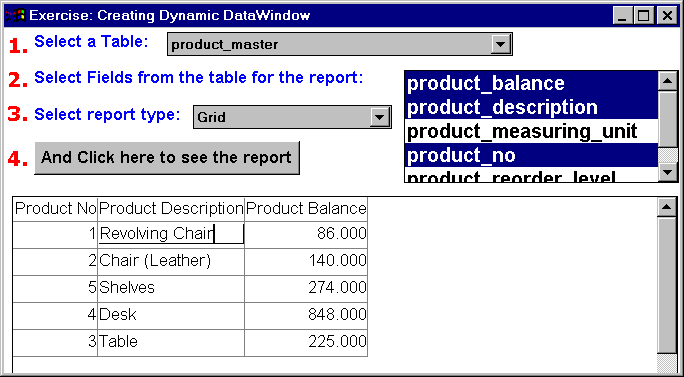
The functionality of this window is to allow the user to select a table owned by him/her. Upon table selection, the script should bring the columns for the selected table and display them in a list box, as shown in the step 2. You should allow the user to select multiple columns from the ListBox. Allow the user to select the presentation style of the report (s)he wants. When every thing is selected, and when the user clicks on the CommandButton shown in step 4, generate the SELECT statement for the selected table depending on the columns selected and create a DataWindow dynamically and display it to the user. If the user doesn't select any column, display all columns in the selected table for the report. If the user doesn't select any presentation style, set the default to 'Grid'.
|
Tip: |
|
|
Solution: |
| Home | Previous Lesson: Review Questions & Answers Next Lesson: Object Orientation�PB Implementation |