| Home | Previous Lesson: Introduction Next Lesson: Links |
To use DDE, the process demands that at least two applications be involved. The application that requests data or sends executable commands is called the Client, while the application that executes the requested command or returns the requested data is called the Server.
Depending on how the DDE is implemented, an application may be able to act both as the client and a server. PowerBuilder has been developed to support DDE for both.
Applications that wish to participate in DDE must be registered in the Windows registry database. In this database, the operating system stores, in the binary format, the information it requires to organize the conversations. Generally, this registration is done automatically when you install a product, but if you encounter problems, you can view/edit the application's DDE properties.
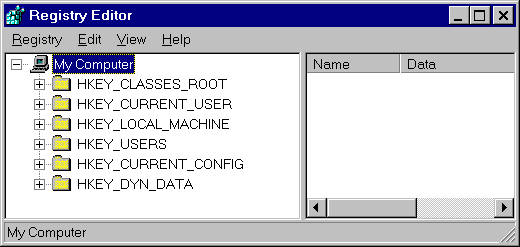
To do this, click on the Windows '95 Start button and select Run and type in REGEDIT. This runs REGEDIT.EXE, bringing up the Registry Editor window.
Unless you understand exactly how the registry works, you can cause your system to lose functionality. Let's see what entries we have for the DDEExec parameter, for the MS-Word program. Double-click on HKEY_CLASSES_ROOT/ Word.Document6/ Protocol/ Shell/ Open/ DDEExec. You will see the value of this variable in the right hand side window, as shown in the following picture. The value there says, open the specified file:
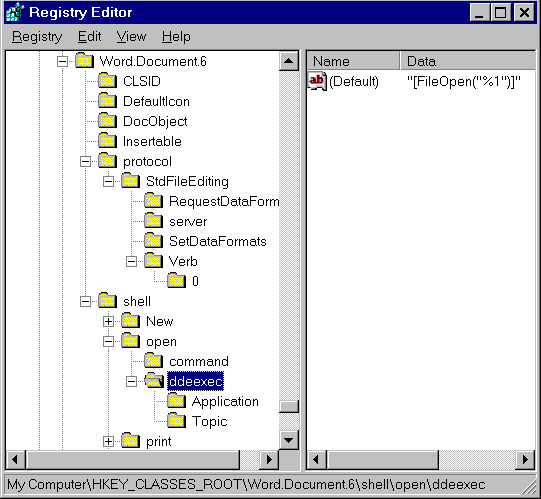
The 'Application' and 'Topic' options are used to refer to the application, you want to communicate with. Let's take a look at each of these entries in detail, while also introducing Item, a subdivision of 'topic'.
The Application is the name under which the server software has been registered in MS-Windows. Typically, it is the name of the executable file without the .EXE extension, but it may be a different name.
The nature of the Topic depends on the server. For Word, a 'topic' may be a document name; for Excel, it may be a name of a spreadsheet. There is also a special topic called 'System', which is supplied by most applications that support DDE.
The 'System' topic is used when there are several topics available - for example, when you are accessing data from multiple spreadsheets. The 'System' topic is also used to perform certain tasks at the application level.
You can see this option only if you are using Windows 3.1. Under a Topic, you may want to access more than one location. For example, Word could use an 'Item Name' to refer a bookmark, while Excel could use an 'Item Name' to access a range of rows and cells.
For a DDE conversation to begin, the client application requests a conversation channel to communicate. This message is broadcast throughout the Windows environment and if the server application is running, a channel, identified by a numerical return, is assigned and then the conversation can begin.
If the server application isn't running, MS-Windows takes control and sends a message to the client letting it know that the server isn't running.
 |
The server application must be running before a DDE conversation can begin. Some applications ( when acting as a client ) automatically load the server, if it isn't already running. PowerBuilder doesn't support this feature. |
You can specify a time out period for a client, for the channel, by specifying value for the DDETimeout parameter.
| Home | Previous Lesson: Introduction Next Lesson: Links |