| Home | Previous Lesson: Parent-Child Tables Data-Entry Next Lesson: Modifying DDDW Dynamically |
A column in a DataWindow can have one of the six edit styles. We've looked at most of them and seen situations where each style can be applied, but one that we haven't looked in detail is the DropDownDataWindow Edit Style. When using other edit styles, the information you supply is stored in the PowerBuilder library. For example, we have "e_tran_type", which is of DropDownListBox edit style. This, "e_tran_type" is a PowerBuilder object and is stored in the PowerBuilder library. This is fine for the static data, but if you want to use dynamic data, the best solution would be to use DropDownDataWindow edit style.
For example, when adding a new product to the product_master table, "product_measuring_unit" should exist in the "units" table. We can use a DropDownDataWindow to display the information in the "units" table and allow the user to select from the available options, rather than checking the existence in the "units" table by issuing an SQL statement.
For it, all we need to do is create a DataWindow for the "units" table, with SQL Select data source and tabular presentation style. We already created this DataWindow, "d_units_dropdown". Open that DataWindow in the DataWindow painter. Observe that, we deleted everything from the header.
Now, we need to change the edit style of product_measuring_unit column in "d_product_maint" DataWindow. Open the "d_product_maint" DataWindow, and double-click on the "product_measuring_unit" column. Click on the Edit Style tab page.
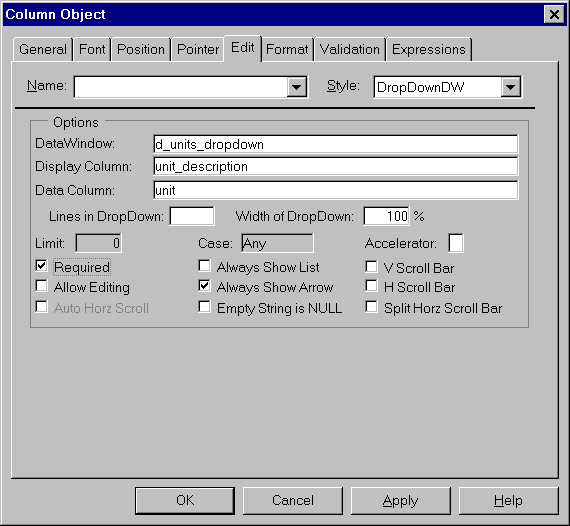
Select "DropDownDW" for the edit style prompt, "d_units_dropdown" for the DataWindow prompt, "unit_description" for the "Display column" prompt and "unit" for the "Data Column" prompt. Selecting "Always Show Arrow" option would always display an arrow at the right side of the column in the DataWindow.
Now, if we preview "d_product_maint" DataWindow, you'll see that for the "product_measuring_unit" column, we have a DropDownDataWindow containing details from the "units" table. An user always sees the unit_description on the screen, but, PowerBuilder sends the value of the "Data Column", i.e., "unit" to the database. This edit style allows us to use dynamic and up-to-date data with descriptive options.
| Home | Previous Lesson: Parent-Child Tables Data-Entry Next Lesson: Modifying DDDW Dynamically |